
Application Management
The Applications page provides a list of discovered application based on the last run data sync.
Use Run sync to discover applications, for new tenants, or Sync Applications when data has already been populated.
Users can Search applications to quickly locate specific application data.
Applications and systems are cataloged and can be managed based on their type:
- Web applications
- APIs
- Databases
- Infrastructure components
- SaaS applications
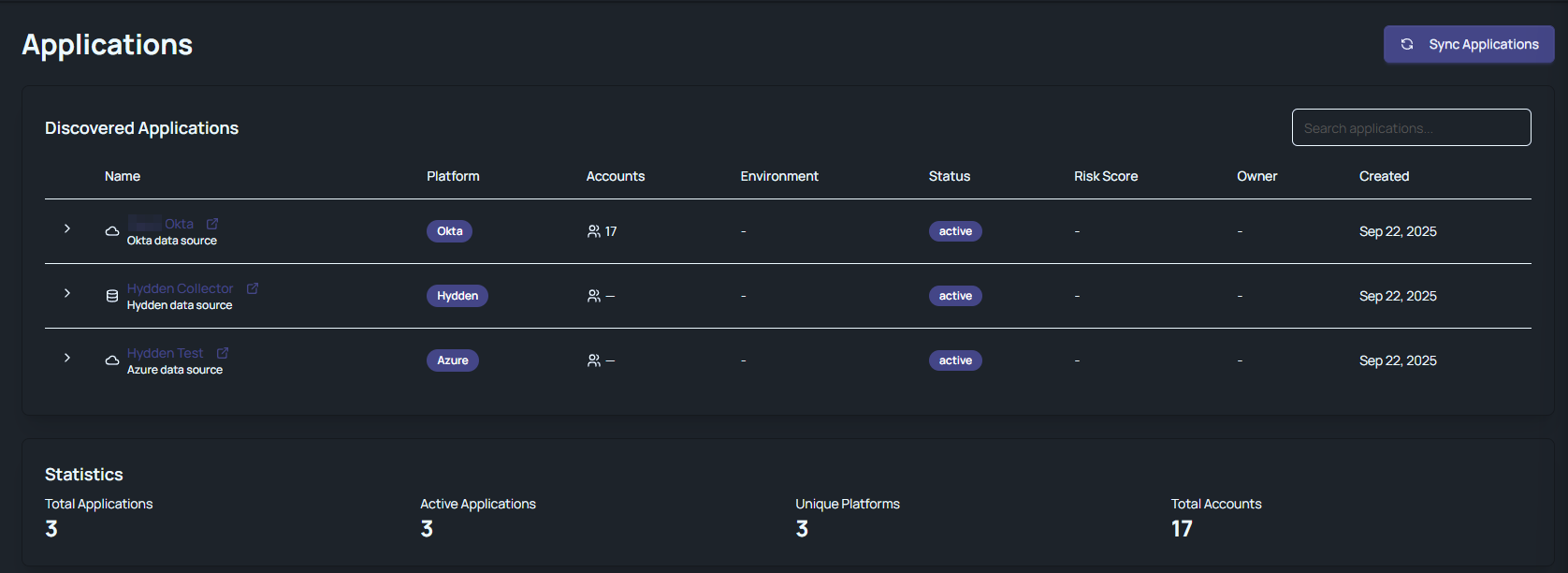
Clicking the name of the data source in the table grid opens an information page for that specific data source. The page shows information like
- Risk Assessment with an average risk score and meta data like number of accounts and last updated date.
- MFA Status with an average risk score and meta data.
- various tiles providing risk metrics like password issues, stale or privileged accounts, etc.
Clicking the chevron at the start of the table row, opens the Associated Accounts in a curtain table grid. The data columns in the table grid are
- Account Name
- Display Name
- Type
- Department
- Status
To close the table grid, click the chevron again.
The statistics block provides a quick overview of:
- Total Applications
- Active Applications
- Unique Platforms
- Total Accounts