
API Tokens
Any application API access configuration happens through the API Tokens configuration tab.
Administrators use + Add API Token to access the API key configuration workflow.
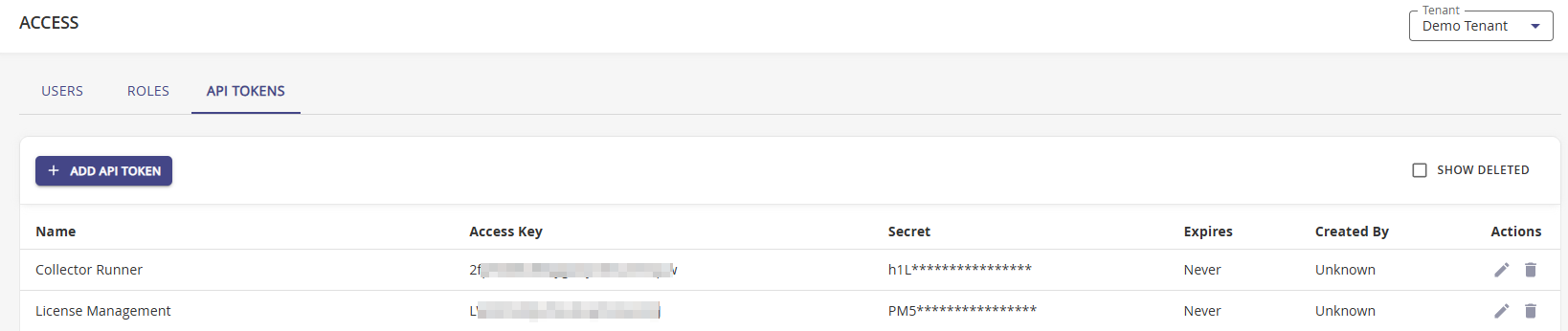
Configuring API Access for Applications
Navigate to Access | API Tokens.
Click + Add API Token.
On the Add Api Token modal, enter the application name.
Copy your application secret into the Secret field.
Use the Copy to Clipboard button to use the data during setup on your external application.
Use the Expiration drop-down to change the default to other time-frames.
The options are:
- 7 Days
- 30 Days
- 60 Days
- 90 Days
- Expiration Date, which is the default that uses a 30 day expiration. The date can be edited at any time.
- No Expiration. This option is not recommended for production environments and should only be used for testing.
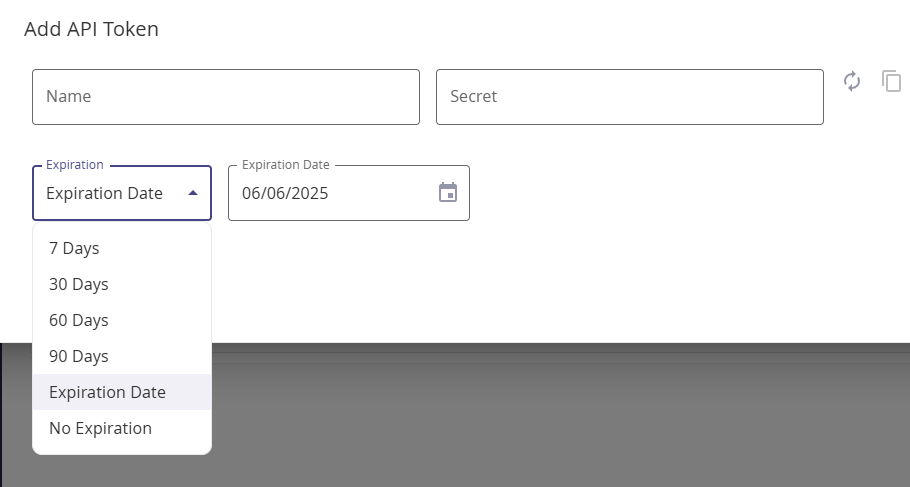
Use the Expiration Date field to specify a token expiration date that falls outside the available 7 to 90 days expiration windows.
Click Add.