
Adding a Vaulted (Privileged) Credential
For Hydden to access and use any of the vaulted data collected, a Vaulted Credential must be configured. Vaulted Credentials in the Hydden Platform are what is known as a Privileged Credential in the CyberArk Platform. The credential configuration is based on a multi-step workflow.
The platform credential, is used to access and retrieve the list of vaults or safes and the accounts and roles, etc. in the integration product. The Vaulted Credential can than be pointed to access one of those vaulted accounts to use as a credential.
How to Create a Vaulted Credential
This procedure shows the vaulted credential configuration steps based on a CyberArk integration.
Navigate to Configuration | Settings.
Select Credentials and click + Add Credential.
From the Credential type drop-down, select Vaulted Credential.
From the Vault Credential Connections drop-down, select the vendor platform credential you would like to use.
For Safe, enter the specific safe name that this vaulted credential is authorized to access.
For Account, enter the specific account Hydden discovered in that safe or vault.
Select Query Vault, if you wish the safe to be queried.
For Reason, enter a use case specific reason, especially if you are using more than one vaulted credential for various safes in your organization.
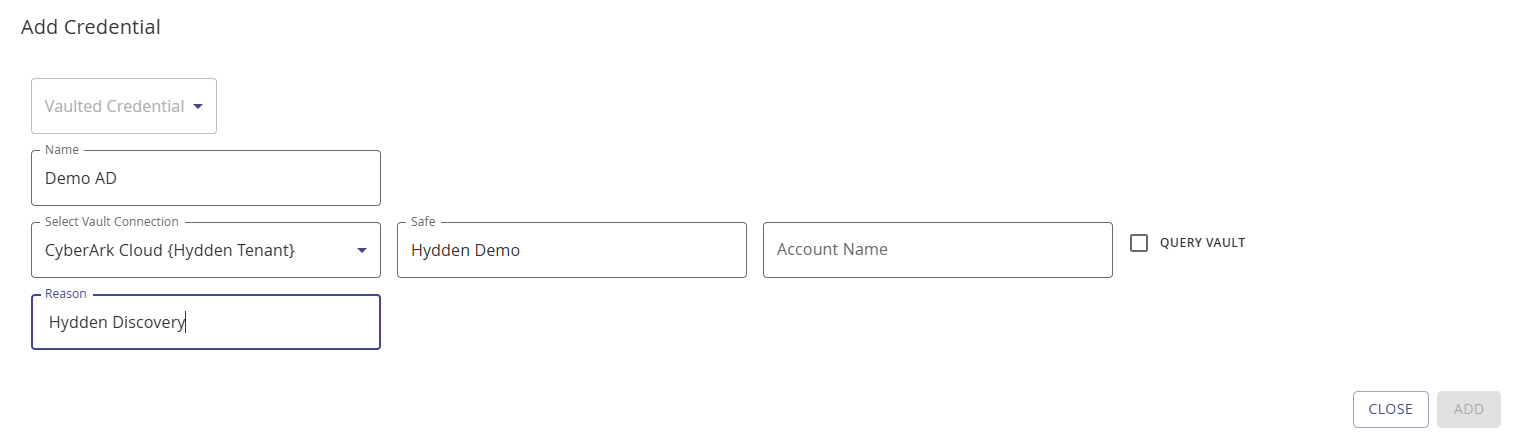
Click Add.