
Group Membership Deviation (Z-Score)
Threat Rule: Group Membership Deviation (Z-Score)
The Group Membership Deviation (Z-Score) threat rule detects accounts with group membership outside the standard distribution for accounts. It allows the selection of a min/max Z-Score and a min/max Mean group membership to identify potential outliers for account group membership on a platform. Customers should customize the default rule to fine-tune the min/max values as required for their organization.
The default settings are:
- Min Z-Score of 3, which means 3 standard deviations above the mean.
- Score of 8.

Report: Account Z-Score
Navigate to Search Library | Detections and select Account Z-Score.
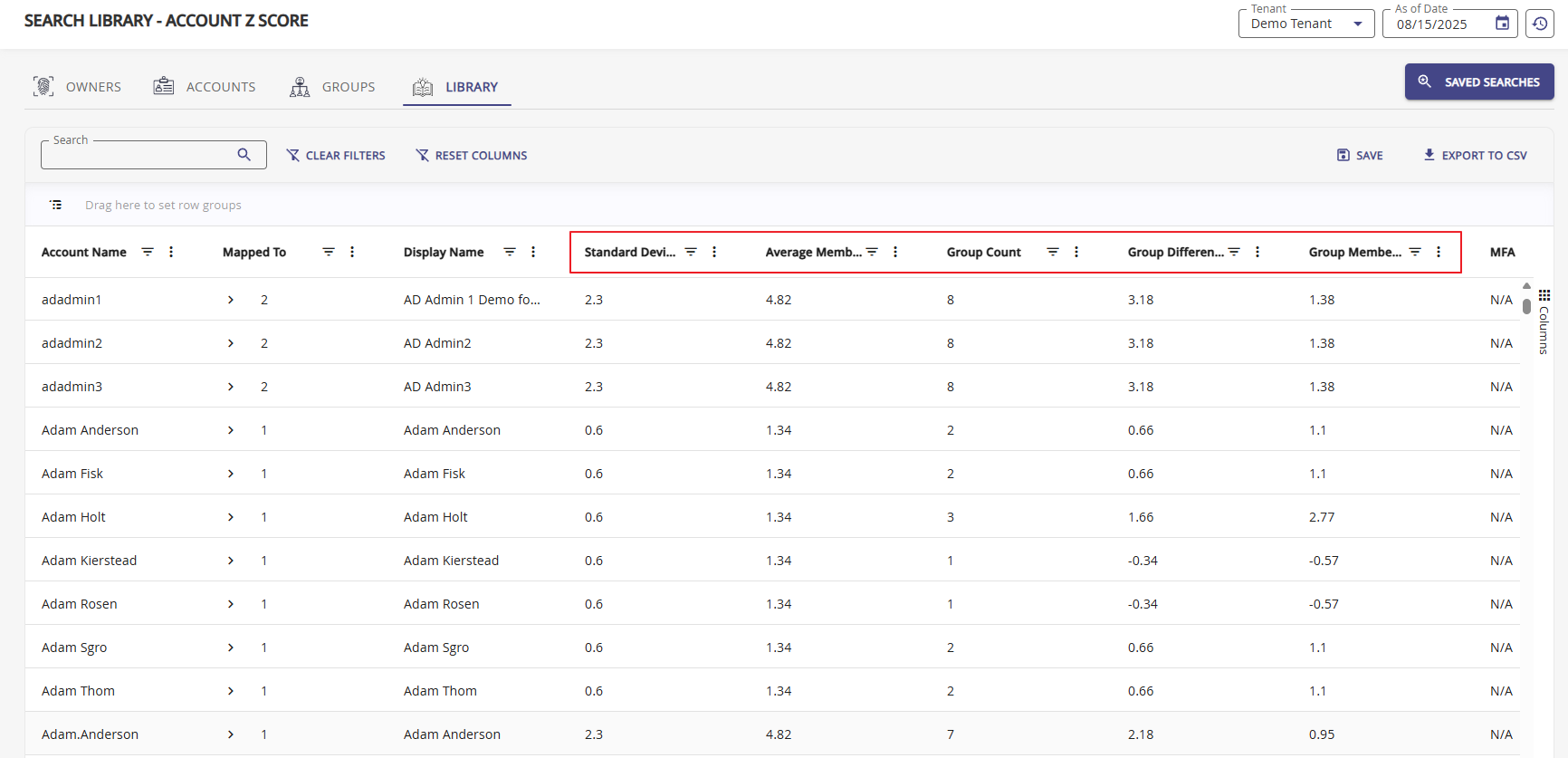
The Account Z-Score report displays the calculated mean (Group Membership Z-Score) and standard deviation values. Using the filter options, organizations can search for specific ranges to identify accounts that pose a threat. The higher the Z-Score, the higher the potential threat.
Use the Columns config to manipulate your table grid. Each columns provides filter and sorting options.
Columns for Z-Scores
- Standard Deviation
- Average Member Count
- Group Count
- Group Difference
- Group Membership Z-Score