ServiceNow Ticket Actions
Follow the steps below to add a ServiceNow Action Provider.
Prerequisites
A ServiceNow credential configured in the Hydden platform.
NOTE
For ServiceNow incident management creation, the ServiceNow account should be marked as a Web Service Access Only account. Custom roles are not required.
Creating a ServiceNow Provider
- In Hydden, navigate to Configuration | Automate.
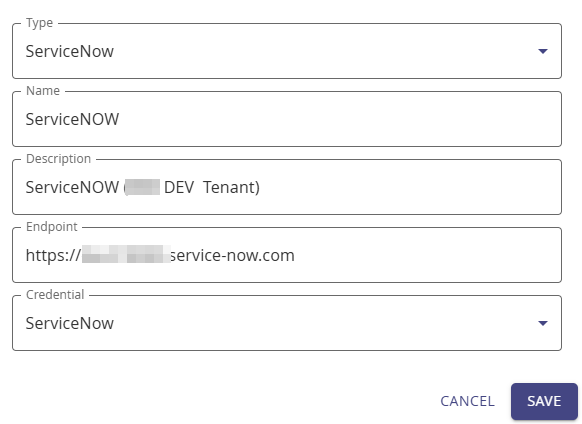
- On the Providers tab, click + Add New.
- On the modal, from the Type drop-down, select ServiceNow.
- For Name and Description, provide a use case relevant provider name and description details.
- From the Type drop-down, select ServiceNow.
- For Endpoint, provide the ServiceNow endpoint from your ServiceNow tenant.
- From the Credential drop-down, select the pre-configured ServiceNow tenant credential.
- Click Save.
Creating a ServiceNow Workflow
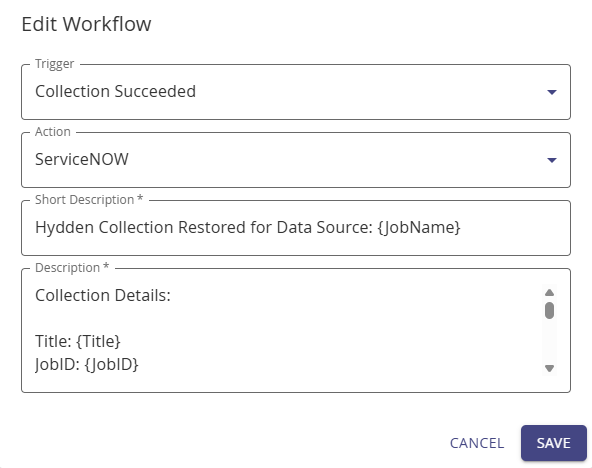
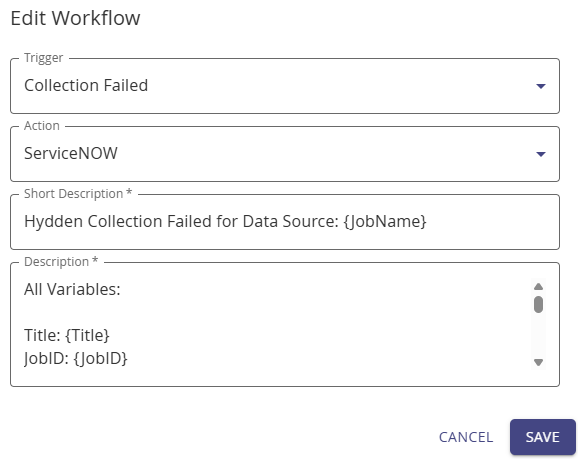
- Navigate to Configuration | Automate.
- On the Workflow tab, select + Add New.
- For Name and Description, provide a use case relevant workflow name and description details.
- From the Trigger drop-down, select ServiceNow.
- From the Action drop-down, select your configured ServiceNow provider.
- For Short Description, provide a title like description for the ServiceNow ticket, for example, Collection in [data source x] failed - please investigate.
- For Description, provide a detailed ticket description. The available variables are auto-displayed when you type { into the text field. Refer to Triggers to see the complete variable list.
- Click Save.
NOTE
A collection must be run successfully at least once before actions can be triggered.