
Tenant Config
Through the Tenant menu, Administrators access the Edit Tenant modal to view and/or edit various tenant-specific parameters.
Use the License button to request a license. Refer to On-prem Licensing.
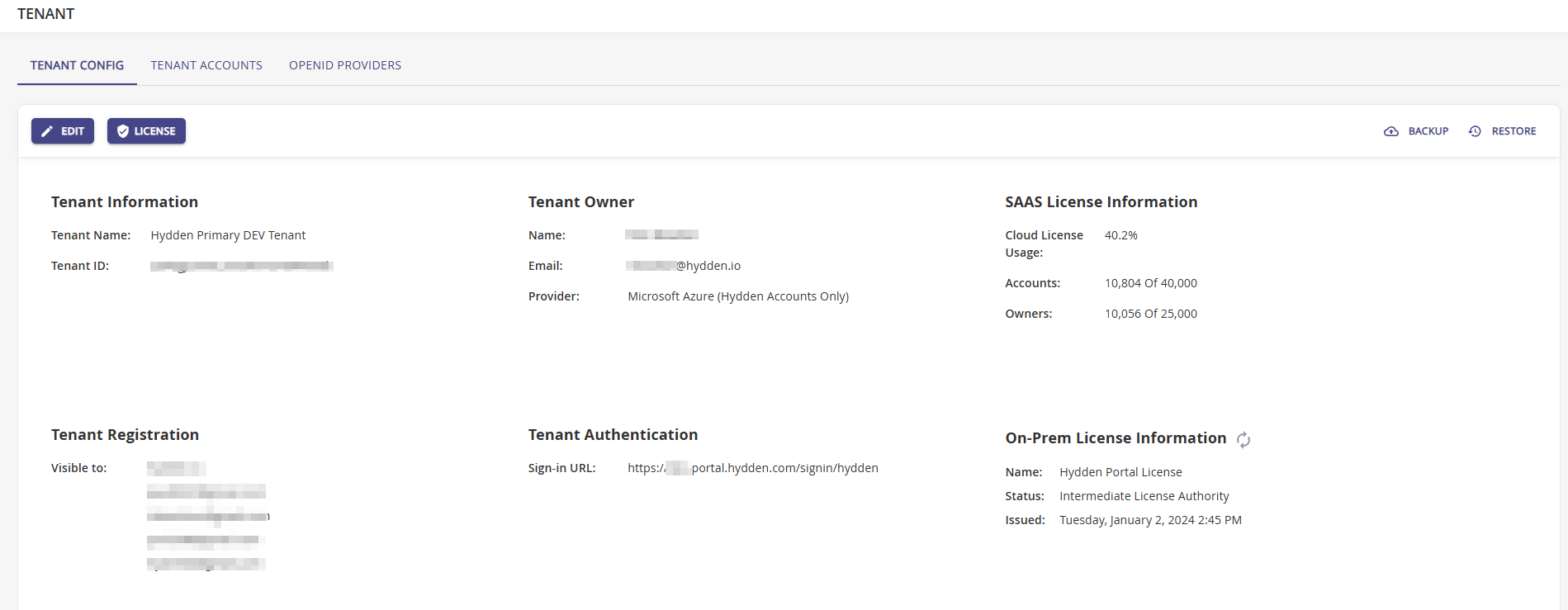
| Block | Label | Description |
|---|---|---|
| Tenant Information | Tenant Name | The name based on the tenant registration. |
| Tenant ID | The unique identifier for the specific tenant | |
| Tenant Owner | Owner | The owner name, who is usually the main administrator for a company's tenant. |
| Specifies the tenant's owner's email address. | ||
| Provider | The main OIDC provider configured for tenant | |
| SaaS License Information | Cloud License Usage | Percentage indicator about the current license use level. |
| Accounts | Number of accounts discovered by collectors configured on the tenant. It shows number of accounts from a total possible number based on license, usually x of 250000. | |
| Owners | Number of owners identified through data collection on the tenant. It shows the number of owners from a total possible number based on license, usually x of 25000. | |
| Tenant Registration | Visible To | This is tenant visibility information on which users can access the tenant. Usually specified via the user's email addresses. The visibility can also be managed via group memberships or granted to another tenant all together. |
| Tenant Authentication | Sign-in URL | The sign-in landing page for the tenant specified during the tenant registration. |
| On-Prem License Information | Name | The license name. Use this reload icon to recycle the license. |
| Status | The current license status. | |
| Issued | Day, date, time information when the license was issued. | |
| Features | All enabled feature flags based on the primary tenants configuration. | |
| Accounts | Number of accounts vs the license limit. | |
| Owners | Number of owners vs the license limit. |